
Buying a new laptop or building a PC almost always leads to one confusing moment at the checkout page: should you go with a 1TB SSD or spend a little more for 2TB? It seems like a small decision, but it can affect how smoothly your computer runs, how much money you save, and how soon you’ll have to deal with the dreaded “storage almost full” notification.
This guide breaks down the 1TB vs 2TB SSD debate in plain, simple language, so you can make a decision that actually fits your lifestyle instead of just guessing.
What Is an SSD? (Quick Primer)
An SSD, or solid-state drive, is the storage component inside your computer that holds your operating system, apps, games, photos, and files. Unlike older hard disk drives (HDDs) that use spinning magnetic disks, SSDs store data on flash memory chips. This makes them significantly faster, quieter, and more durable since there are no moving parts.
The “1TB” or “2TB” label simply refers to how much data the drive can hold one terabyte (roughly 1,000 gigabytes) or two terabytes (roughly 2,000 gigabytes). The real question isn’t which one is better in general, but which one is better for how you actually use your computer.
1TB SSD Overview
A 1TB SSD has become the standard middle-ground option for most laptops and desktops sold today. It offers a healthy amount of space without pushing your budget too far.
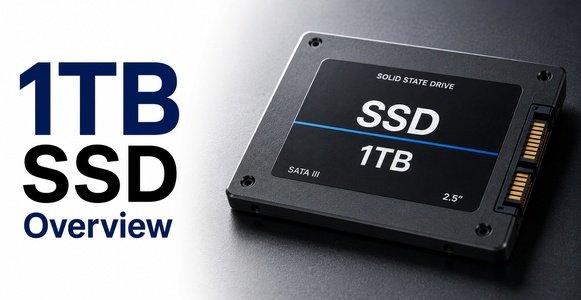
Keep in mind that the “usable” space is always a bit less than the advertised number. After formatting and factoring in the operating system, you’ll typically end up with somewhere around 900GB of actual usable storage.
Who a 1TB SSD works well for:
- Students who mainly use their laptop for browsing, assignments, and streaming
- Office workers handling documents, spreadsheets, and video calls
- Casual gamers who play a handful of titles at a time
- People who rely heavily on cloud storage instead of local files
Pros:
- More affordable, especially for budget-conscious buyers
- Enough space for most everyday tasks without feeling cramped immediately
- Widely available across almost every laptop and desktop price range
Cons:
- Can fill up quickly if you install several large games or work with 4K video
- May require you to regularly delete old files to make room for new ones
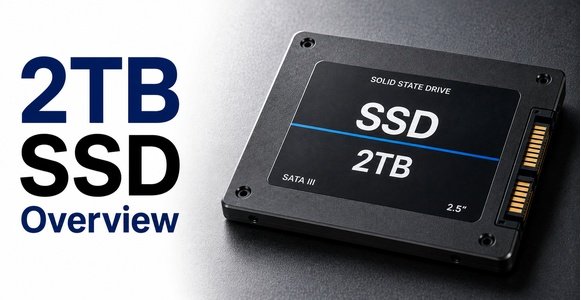
2TB SSD Overview
A 2TB SSD doubles your available space, and for a growing number of users, it’s becoming the more practical long-term choice rather than a luxury.
Who a 2TB SSD works well for:
- Gamers who install multiple AAA titles at once
- Video editors and content creators working with large raw footage files
- Photographers managing extensive photo libraries
- Professionals running multiple large software programs or virtual machines
Pros:
- Much more breathing room, so you’re not constantly managing storage
- Fewer interruptions from “low storage” warnings
- Better long-term value since your files and software needs will likely grow over time
Cons:
- Higher upfront cost compared to 1TB
- Can feel like overkill if your usage is genuinely light
Price Comparison
When people compare 1TB vs 2TB SSD pricing, the difference is rarely double. In most cases, 2TB drives cost somewhat more in total, but less per gigabyte. This means that if your budget can stretch a little further, you’re often getting better long-term value with 2TB.
That said, budget still matters. If money is tight and your usage is light, there’s nothing wrong with choosing 1TB now and adding external or cloud storage later. The decision comes down to weighing immediate cost savings against future convenience.
Performance Differences
Here’s something that surprises a lot of buyers: capacity alone doesn’t usually make an SSD faster. A 1TB and 2TB version of the same SSD model will typically perform similarly in terms of everyday responsiveness booting up, opening apps, and loading files.
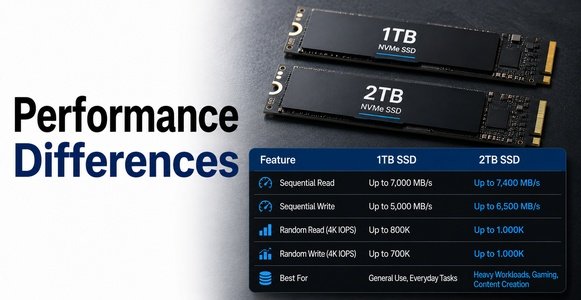
However, there’s a technical nuance worth knowing. Many SSDs use multiple NAND flash channels to read and write data in parallel. Higher-capacity drives sometimes have more of these channels active, which can slightly improve sustained read and write speeds during heavy tasks like transferring large video files. In everyday use, though, most people won’t notice a meaningful difference between the two.
Storage Needs by User Type
| User Type | Recommended Capacity | Why |
| Student / office user | 1TB | Mostly documents, browsing, light apps |
| Casual gamer | 1TB–2TB | Depends on number of installed games |
| Hardcore gamer | 2TB | Modern AAA games often exceed 50–100GB each |
| Video editor / content creator | 2TB or more | Raw footage and project files are large |
| Programmer / developer | 1TB–2TB | Depends on number of local environments, tools, and datasets |
How Much Space Do Common Files Take?
To make the 1TB vs 2TB SSD decision easier, it helps to know roughly how much space common items actually use:
- Operating system (Windows/macOS): 20–40GB
- Average AAA game: 50–150GB per title
- A full-length 4K video (per hour): 40–100GB depending on quality
- Photo library (thousands of RAW photos): 100GB+
- Music library (a few thousand songs): 20–30GB
- Office documents and spreadsheets: Usually just a few GB in total
If you multiply a few AAA games or a growing 4K video collection across time, it becomes clear how quickly 1TB can fill up compared to 2TB.
Future-Proofing Considerations
File sizes have a habit of growing over time. Games become larger with every generation, video resolution keeps increasing, and software updates tend to expand rather than shrink. Choosing a bit more storage today can help you avoid the hassle of upgrading or replacing your drive a year or two down the line.
Cloud storage is a helpful supplement, but it isn’t a full replacement for local SSD space, especially for gamers and creators who need fast, reliable access to large files without depending on an internet connection.
Which Should You Buy? (Decision Guide)
Ask yourself these quick questions:
- Do I install more than 3–4 large games or software programs at once?
- Do I work with video editing, photography, or large creative files?
- Do I frequently run out of space on my current device?
- Am I planning to keep this device for several years?
If you answered “yes” to two or more of these, a 2TB SSD is likely the smarter long-term choice. If most of your answers were “no,” a 1TB SSD will comfortably meet your needs while keeping costs lower.
Frequently Asked Questions (FAQ)
Is a 1TB SSD enough for gaming?
Yes, for casual gamers with a handful of installed titles, 1TB is usually sufficient. Heavy gamers with large libraries will likely outgrow it faster.
Is a 2TB SSD worth the extra cost?
For gamers, editors, and creators, yes the extra space reduces the need for constant file management and future upgrades.
Can I upgrade from 1TB to 2TB later?
In many desktops and some laptops, yes, either by adding a second drive or replacing the existing one. However, not all laptops allow easy storage upgrades, so it’s worth checking your device’s specifications beforehand.
Does SSD capacity affect speed?
Not significantly for everyday use. Some higher-capacity drives may show slightly better sustained performance during large file transfers, but typical daily tasks feel similar across both sizes.
Conclusion
When it comes down to 1TB vs 2TB SSD, there’s no single “correct” answer it depends entirely on how you use your computer. A 1TB SSD is a smart, budget-friendly choice for everyday users, students, and light gamers. A 2TB SSD makes more sense for gamers, creators, and professionals who work with large files and want room to grow without constant storage management.
Think about your current habits, how your storage needs might change in the next couple of years, and your budget and you’ll land on the option that fits you best.
Related Post:
Is There a Side Effect to Low Power NVMe SSD? A Complete, Easy-to-Understand Guide
Is SSD With Heatsink Worth It? A Complete Guide
How to Factory Reset an SSD: A Complete Step-by-Step Guide
Showing as Unallocated? What It Means and How to Fix It Safely